Debit and Credit Columns and How Conversion Flips Them
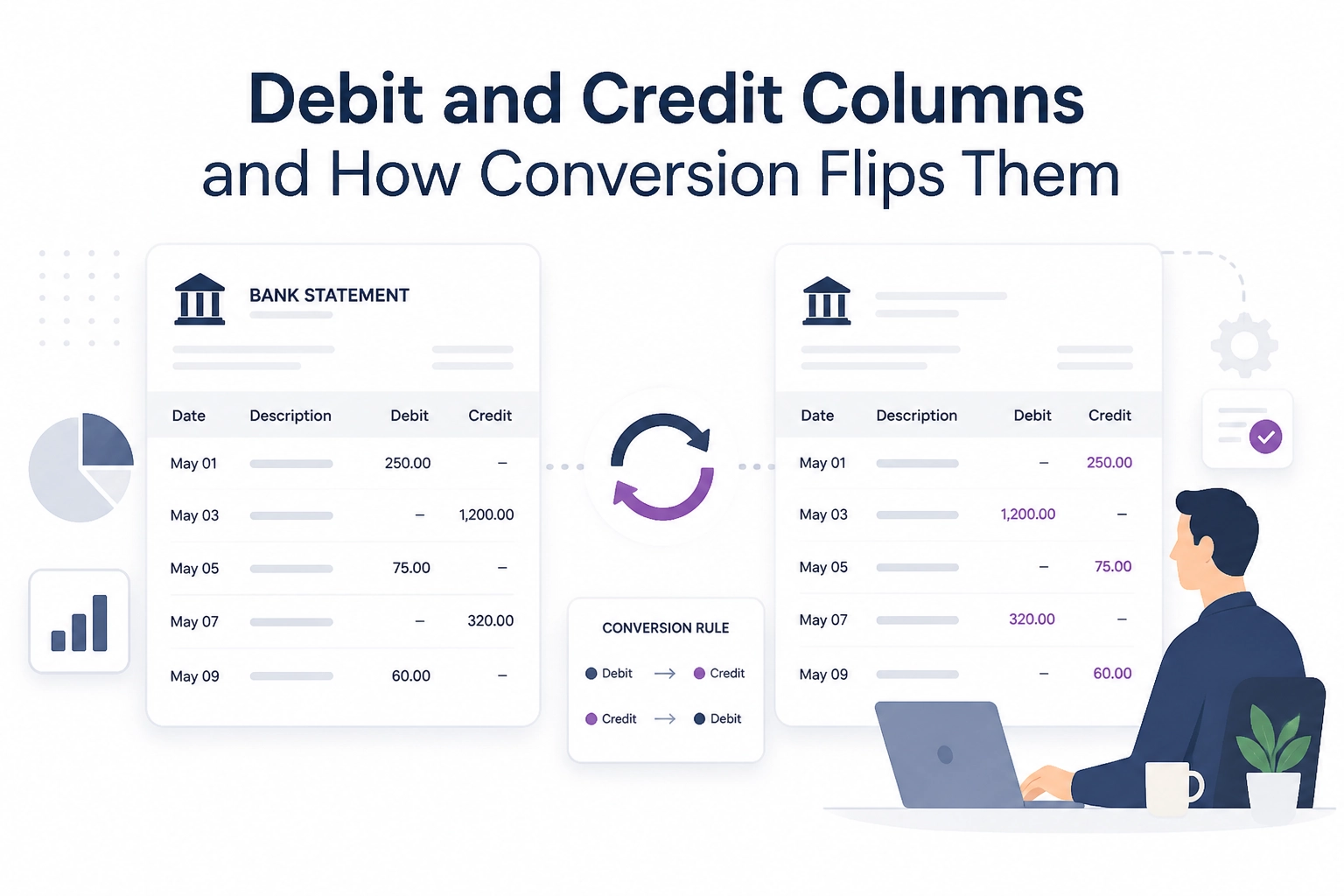
Debit and credit on a bank statement mean money out and money in. See the three ways banks show it and how to check a converted file.
Open a bank statement and you might see two columns, one signed number, or a running balance that moves. All three tell the same story, but read the debit and credit columns the wrong way and a spend analysis becomes an income report. The problem is not arithmetic; it is convention. Conversion that assumes the wrong convention inverts the entire report without warning.
This tutorial explains what debit and credit mean on a bank statement and why the same transaction can appear three ways. You will walk through each convention: separate debit and credit columns, a single signed amount column, and balance delta with running balance columns. Then you will learn how to detect the convention from the statement itself and what to check after conversion. Later sections cover where the flip hides, including credit cards, transfers, and refunds, and how to tie every figure back to the balance column. By the end, you will read a statement's structure before transforming it, so money out stays money out.

What Debit and Credit Mean on a Bank Statement
On a personal bank statement, a debit is money leaving your account and a credit is money arriving. Debit and credit describe direction, and that direction is the root of most confusion.
So a £1,200 salary deposit is a credit. A £45 card purchase, an ATM withdrawal, a standing order and a transfer to savings are all debits, whatever the money was spent on. Getting comfortable with reading your financial transactions in these terms is the first step towards a budget that reflects reality.
Some statements use plain-language headings rather than the word debit, such as Withdrawals, Paid Out or Money Out, and Deposits, Paid In or Money In. They carry the same meaning in plain language.
Debit and credit describe direction only, never category. Rent, groceries and a holiday booking are all debits, which is why no spend analysis can classify a row until it knows which way the money moved.
In a debit column the amount is typically a plain positive number. The size of the number tells you how much; the column tells you which way. Losing that distinction is how a bill becomes income.
Why the Same Transaction Can Appear Three Different Ways
The confusion does not stop at terminology, because layout is the next layer of ambiguity. A £45 coffee may appear as £45 in a debit column, as −£45 in a signed amount column, or as a silent £45 fall in the running balance. Three presentations, one transaction, and three opposite readings if you guess the convention wrong.
The convention belongs to the file, not to the transaction. Any conversion has to establish which layout it is reading before it can decide whether a row is spending or income, and it often does so silently. Formats vary even inside a single institution: Goldman Sachs' developer file catalogue lists BAI, MT940/942/950 and ISO 20022 XML side by side, showing how one provider can carry several conventions at once. Structured formats are not uniform either. Providers can publish their own implementation guidelines on top of a shared camt.053 standard, so no single assumption covers every export.
Everything downstream inherits the parser's guess. If a tool reads a debit column as income, every category total, chart and budget recommendation built on it will be wrong in the same direction. UK date fields compound the problem, as US-default converters routinely misread them.
Convention 1: Separate Debit and Credit Columns
The classic layout gives direction its own real estate: two adjacent amount columns, one for money out and one for money in. Both hold plain positive figures. The debit column carries spending, the credit column carries income, and the column that does not apply is blank, zeroed or shaded.
Direction is therefore purely positional. £45 in the debit column and £45 in the credit column mean opposite things, so any tool that sums columns independently, or reads only populated cells, can invert rows without a visible error. The same trap appears in split-purpose layouts such as Withdrawal/Deposit, or Amount beside a separate Amount Type label, where direction lives in a neighbouring word rather than in the sign.
Run a row-level test: exactly one column should be populated per transaction. Two populated columns usually mean a folded two-line entry, a brought-forward balance or a misaligned PDF table.
This layout is common on printed and PDF statements, where a fixed table survives OCR better than small punctuation. If you also run a business account, see how merchant accounts affect budgets, and confirm both statements use the same convention before comparing them.
Convention 2: A Single Signed Amount Column
Not every statement hands you two columns. Some print one Amount column and carry direction in the sign itself: money out as a negative value, money in as a positive one. Some banks invert that rule, so confirm the direction against a single transaction you already recognise before applying it to hundreds of rows.
The sign can also hide in formatting rather than arithmetic: parentheses around a negative, a trailing minus such as −45, or a separate CR/DR flag column.
Exports break it most often. CSV and OFX files can strip or mangle the sign, and regional number formatting can turn a true minus into a hyphen, an en dash or a stray character that a parser reads as noise. Check that whatever consumes the file is not taking absolute values, because an import that drops signs reads every amount as positive and builds an income report out of rent, fuel and phone bills.
Verify one row first: compare the amount against how the balance moved, then check a second row running the opposite direction before trusting the column as a whole. For the case where the running total itself drops below zero, see what a negative bank account balance means.
Convention 3: Balance Delta and Running Balance Columns
Some statements offer neither a sign nor a dedicated column, so the running balance becomes the only clue to direction. A positive 45 sitting beside a balance that falls from 1,050 to 1,005 is money out, not income.
Order matters. Balance columns can run newest first or oldest first, so calculate deltas in statement order, starting from the opening balance, never in the order rows happen to appear on screen or in a spreadsheet.
Simple deltas also break easily. Several transactions booked on the same day, pending items, and statements that begin or end mid-cycle can all produce a movement that matches no single row.
Allow a small tolerance. Rounding, interest postings and foreign currency conversion can leave a balance change that is close to, but not exactly, the row amount, so compare rather than demanding a perfect match.
Treat the delta as confirmation rather than a first reading. Where a sign or a column already exists, the balance is corroborating evidence. Used alongside the habit of reading a statement for budget insights, it becomes a dependable check on any conversion.
How to Detect the Convention From the Statement Itself
With the balance-delta method understood, the practical question is which of the three conventions a given file uses. Read the headers first. Debit and Credit, Withdrawals and Deposits, Amount with a DR/CR flag, or a bare Amount beside a Balance each points to a different reading, and the exact wording is your strongest clue.
Next, test one transaction whose direction you know, such as your salary credit or your rent payment, and confirm that the sign, the column placement or the balance movement matches what actually happened. Then scan the whole file for negatives. A statement with no negative amounts on any row almost certainly uses separate columns or a balance delta; treating those positives as signed values will invert the entire report.
Reconcile end to end: opening balance plus credits minus debits should equal the closing balance. If the first attempt fails, swap which side you treat as money out and run it again, because a flipped convention usually misses by roughly twice the movement.
Finally, note the file type. A PDF keeps the column layout, a CSV may flatten it into one column with a flag, and OFX and other structured formats carry their own sign rules. Before trusting a PDF import, check what OCR misreads on statements.
What to Check After Conversion
Once you have identified the convention, validate the converted file against the statement before relying on any total.
Tie the balances. Check that the converted opening balance matches the statement's opening balance and the converted closing balance matches the printed closing balance. If either drifts, direction or row capture has already gone wrong.
Reconcile the totals. Total credits minus total debits should equal closing balance minus opening balance.
Spot-check both directions. Compare a known income item, such as a salary payment, refund or transfer in, and a known recurring bill, such as rent, a subscription or loan payment, against the statement page. Check amount and direction.
Compare rows and dates. Match row count and date range to the statement, and inspect PDF page breaks for duplicated or dropped rows. Converting PDF, CSV, XLS or OFX files into categorised budget insights with StatementToBudget.com at no cost does not remove this check, because the import still depends on the convention read from the source.
Check the import itself. Converting files with StatementToBudget.com at no cost still depends on the convention read from the source, so the same checks apply. For OCR-specific risks, see how statement OCR errors distort budgets.
Sense-check categories. If salary or internal transfers rank among top spending categories, or a rarely used category dominates, direction was read backwards. Correct it and rerun the conversion.
Where the Flip Hides: Credit Cards, Transfers and Refunds
Even a clean reconciliation can still hide flips in particular transaction types. Credit card statements invert everyday intuition, because a purchase increases what you owe while a payment to the card reduces the balance. Read one like a current account statement and both directions reverse.
Transfers between your own accounts can appear on two statements, with a different direction on each. Import both sides without direction and the same movement counts as spending and income, inflating both totals. Refunds, chargebacks and reversed transactions can arrive among a run of spending. Without direction, they look like fresh income and quietly shrink the real spending figure.
Cash withdrawals and cash deposits have no counterparty name to explain them, so direction has to come from the sign, the column or the balance alone. That is where a bad assumption is hardest to spot.
Rows in a foreign currency sometimes show both the original amount and the converted amount. Pairing the wrong figures, or treating the rate line as a transaction, either double counts or flips a modest purchase. Understanding how transactions behave across these cases helps you judge what a converted row should look like.
Tie Every Figure Back to the Balance Column
Once you know where the flip can hide, the balance column becomes your referee.
Establish direction before trusting any total. Find one transaction you already recognise, such as a salary credit or rent payment. Decide whether the statement uses separate debit and credit columns, a sign, or a balance delta, then check that reading against the running balance.
Reconcile the whole statement to the printed opening and closing balances. If it does not meet, suspect a flipped convention before you suspect the data.
After every conversion, spot-check a salary credit and a recurring bill. Glance at category totals for income appearing as spending, or spending appearing as income.
Keep the original statement beside the converted file until direction, amount and row count agree. Then let the numbers do the talking.
Conclusion
Debit and credit are not fixed labels; they are conventions you must read from each statement. Separate columns, signed amounts and balance deltas can all describe the same transaction, so direction comes from the statement's structure, not from the word alone. The flip is most likely around credit cards, transfers, refunds, cash entries and foreign currency rows, where a sign or paired amount is easy to misread. The running balance is your referee: establish one known transaction, reconcile to the printed opening and closing balances, and spot-check income and recurring bills after conversion. Take one recent statement and run these checks before you trust any total. Do that and conversion stops being guesswork and becomes a repeatable, verifiable process.